
How to stop losing patient leads from Instagram, WhatsApp and Facebook
Published 23 October 2026Reviewed 23 October 202610 min read
On this page
Why do social media leads go missing?
One prospect replies to your Instagram story, another asks for a price on WhatsApp, a third leaves a message on your Facebook page. Each sits on a different phone, in a different app, with a different person. Nobody is sure who answered; the messages on a coordinator's phone wait unseen while they are on leave.
The loss mostly happens in three places: a late first reply, an unclear owner of the conversation, and follow-up that is forgotten after the first reply. All three are solved by routine more than by tools. This guide describes a plain routine that puts every prospect on the same path, whichever channel they come through.
How do you set up a single place for all enquiries?
Do not expect Instagram and Facebook messages to flow somewhere by themselves: for these channels, the routine is to bring the person into the shared list by hand or through a link.
Choose one front door
The link in your bio, the link in your stories and the link you send after every message should lead to the same place: the lead form. When a patient fills it in, the record lands with its owner according to your assignment rules.
Add message-only prospects by hand
Write down who adds a person who came by message to the case list, and when: for example the duty person who watches the inbox, every half hour on working days. A contact record is opened once; someone writing with the same e-mail or phone does not create a second one.
Move the conversation to the case
Write the important part of the chat (what they asked, what was said, when you will get back) on the case as a note or a logged conversation. The case, not that phone, owns the conversation.
Take sensitive information out of the chat
Tell the patient “I am sending you a secure pre-assessment link”; photos, medication and conditions go into the secure form. Do not collect special-category personal data in a social media DM.
Settle who owns the accounts
The clinic's Instagram and Facebook accounts should be tied to shared team access, not personal phones; when an employee leaves, so does their access.
How do you tag the source? UTM examples
According to Google Analytics help, utm_source, utm_medium and utm_campaign should always be used, and values are case sensitive, so always use lower case and one spelling. This naming lets you read where each link came from at a glance.
- Instagram bio
- utm_sourceinstagram
- utm_mediumbio
- utm_campaign examplegeneral
- Instagram story
- utm_sourceinstagram
- utm_mediumstory
- utm_campaign exampleimplants-september
- Facebook page
- utm_sourcefacebook
- utm_mediumpage
- utm_campaign examplegeneral
- WhatsApp status or broadcast link
- utm_sourcewhatsapp
- utm_mediumstatus
- utm_campaign examplehair-autumn
- QR code on a poster or business card
- utm_sourceqr
- utm_mediumprint
- utm_campaign exampleclinic-entrance
- Intermediary link
- utm_sourceagency-name
- utm_mediumpartner
- utm_campaign examplegeneral
Which reply templates do you need?
A template speeds up writing; a message without the patient's name and question looks like a bot. In every template, write the name and the question yourself.
- First reply: “Hello Anna, thank you for your message. I'm Elif, your patient coordinator. To help with dental implants I have two quick questions: when are you thinking of having treatment, and what did your dentist say so far? I'll send you a secure pre-assessment link for the details.”
- A price question: “Prices depend on the treatment, so I can't give you a reliable figure without knowing your case. Once you complete the pre-assessment, our doctor reviews it and we'll send a written quote within two working days that shows what is included.”
- Asking for photos or an X-ray: “Could you upload the photo through this secure link instead of this chat? That way your health information is seen only by the team involved: [link].”
- Reminder after silence (day 3): “Hello Anna, were you able to open the link I sent? If anything is unclear I'm happy to help. And if you're not interested, a quick word is enough.”
- Closing message (day 14): “I won't write again, but our door is open. When you've decided, you can reach us through the same link or this number.”
A follow-up rhythm
This rhythm is a reasonable start for most clinics; take care not to burden the prospect. If someone says they are not interested, do not write again, and record the reason when you close the case.
- A few minutes to 2 hours after the message
- What happensFirst reply and pre-assessment link
- WhoDuty coordinator
- Same day
- What happensCase opened, owner assigned, source recorded
- WhoAssigned coordinator
- Day 3
- What happensA polite reminder if the form is not filled in
- WhoOwner
- Day 7
- What happensCall, or write on a different channel
- WhoOwner
- Day 14
- What happensLast message; if the case is lost, choose a reason
- WhoOwner
Handover: what happens when a coordinator goes on leave or a shift ends?
A lead should belong to the record, not to a person. If the conversation stays on one phone, handover is impossible. If the case says what was discussed, what was promised and the date of the next step, another coordinator can take over from the same place.
Set three simple rules: no unowned messages at the end of a shift; a coordinator going on leave hands over their open cases; when someone leaves the team, their cases are reassigned, not closed.
How should you use WhatsApp?
Patients often want to write on WhatsApp, and that is normal. If you like, connect your own WhatsApp Business (Cloud API) account in Settings → Channels: incoming and outgoing messages then appear in the case conversation. If you have not, the WhatsApp button on the contact card opens a WhatsApp chat with the person's number on your own phone or computer and fills the opening text from the template you choose; then you record the important part on the case.
So use WhatsApp for first contact and short coordination, not as the main home of medical information and documents. Keep quotes, consents and documents in the patient portal and e-mail.
How is this done in Clinic Offerly?
Clinic Offerly does not connect to the Instagram or Facebook inbox and has no chatbot; it carries the routine above with the case list, the source record, tasks and, if you want, enquiries from Meta, Google or TikTok ad forms.
Make the lead form the front door
The form is hosted at its own address; use that address in your bio and stories. UTM tags on the page appear as the source on the case.
Write the assignment rule
Round-robin assignment hands new enquiries to coordinators in turn; cases past their response target are flagged on the board and the overview.
Add message-only prospects as cases
Open the contact and the case by hand and pick the channel the message came through in the source field.
Reply from templates
Message templates fill in the person's name, the clinic's name, the case reference and the member in charge. The WhatsApp button takes its opening text from a template; e-mail and portal messages use the same templates.
Open the next step as a task
After every reply open a dated task such as “remind in 3 days”; when it falls due the notification bell rings.
Set up simple automations
Rules that open a task when a sent quote has not been opened for some days, or notify a member when a response target is missed, are set up without code.
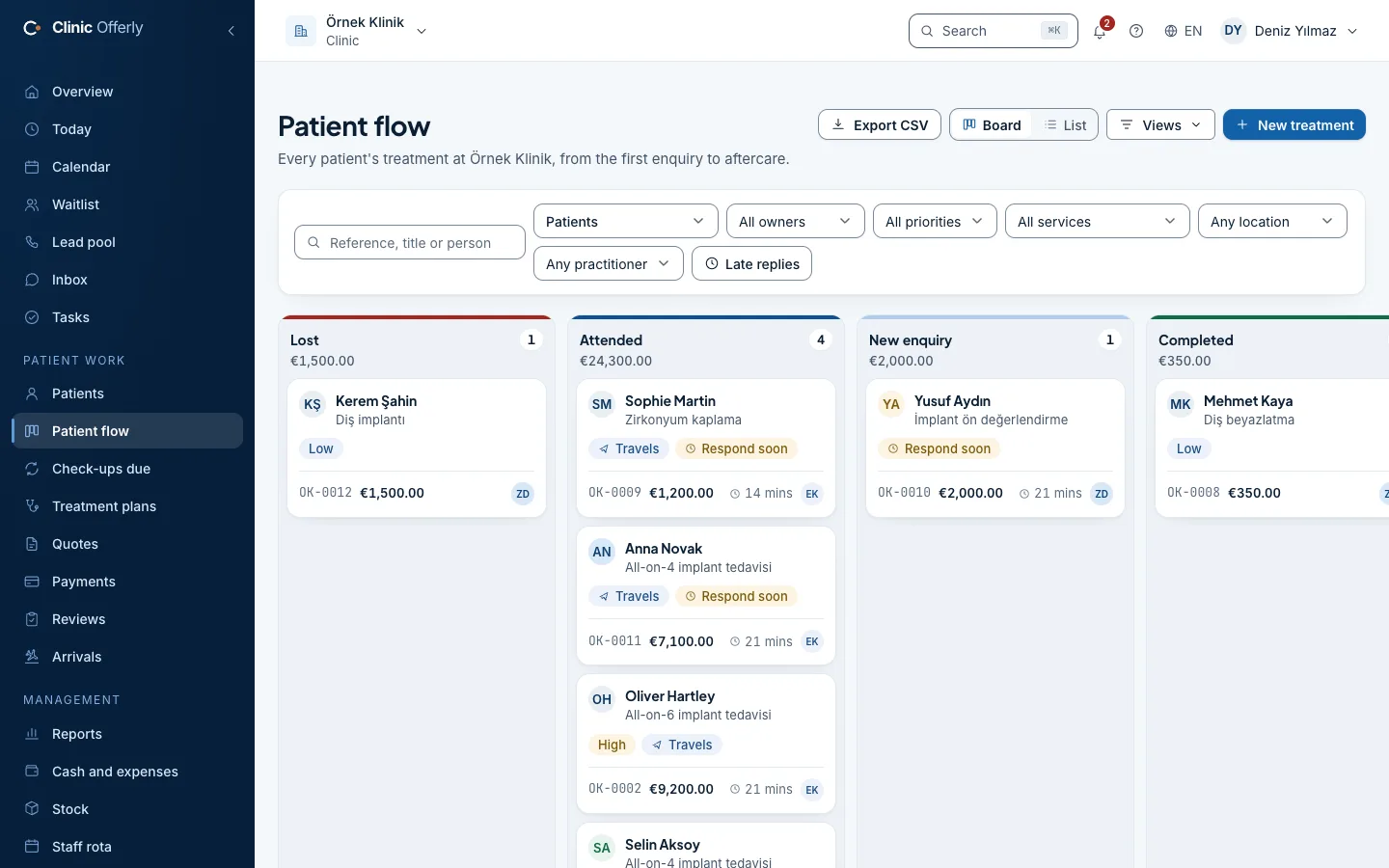
Case board
No enquiry stays unowned
Every card in the new-enquiry column has an owner, a source and an expected value. Cases past their response target are flagged.
- Round-robin assignment
- Response target and sweeper
- Stages at your fingertips
Contact card
Call, WhatsApp and e-mail in one tap
The contact card shows the patient's language, consents and where they came from; the call, WhatsApp and e-mail buttons start the conversation.
- Where they came from (source and campaign)
- Consent records with channel and date
- One-tap WhatsApp link
Frequently asked questions
Can I see Instagram messages in Clinic Offerly?
No. Clinic Offerly does not connect to an Instagram or Facebook inbox. You add the person who messaged you as a case by hand, or send them to the lead form, and write the important part of the conversation on the case. Enquiries from ad forms (Meta, Google, TikTok), on the other hand, become cases on their own through your own accounts.
Can I send WhatsApp messages automatically?
Not as promotion. Clinic Offerly sends no bulk or marketing messages. If you connect your own WhatsApp Cloud API account, informational messages such as appointment reminders go from that account with approved templates, and you can reply from the case conversation. If you have not, the WhatsApp button on the contact card opens the chat on your own phone with an opening text filled from a template; you send the message yourself.
Can I send bulk promotional messages to leads?
The Ministry of Health regulation prohibits promotion by letter, SMS, e-mail or social messaging tools without people's knowledge and consent, and commercial electronic messages need prior approval as well. Check your plan with your lawyer before launching it.
Is it allowed to give a price in a message?
The general rule is that promotion may not include prices or discounts. A personalised written quote after a pre-assessment is the usual route rather than quoting a price to a stranger. For borderline cases ask the provincial health directorate or your lawyer.
How fast should the first reply be?
There is no single time for everyone. A few minutes to two hours in working hours is a good internal target; answer messages that arrive out of hours first thing the next morning. Measure your own median first-response time and aim to lower it every month.
How do I keep source data accurate?
Use the same lower-case naming for every link (utm_source, utm_medium, utm_campaign), pick the source when you open a case for message-only prospects, and look at conversion by source in reports at month end.
Sources
- Regulation on Promotion and Information Activities in Health Services, Article 5 (in Turkish) — Resmî Gazete, no. 33075, 12 November 2025
- Law No. 6563 on the Regulation of Electronic Commerce, Article 6 (in Turkish) — Mevzuat Bilgi Sistemi, Current text
- Law No. 6698 on the Protection of Personal Data, consolidated text (in Turkish) — Mevzuat Bilgi Sistemi, Current text
- [GA4] Campaign URL builder: UTM parameters — Google Analytics Help, Current page
Stop losing enquiries
Try Clinic Offerly free for 30 days, no card needed. Every plan has every feature.
Related reading
Free tools
30-day free trial
Try Clinic Offerly with your own team
Every feature is open for 30 days, and no card is needed to start.