
ProductScheduling and online booking
A calendar that never books two patients into one slot
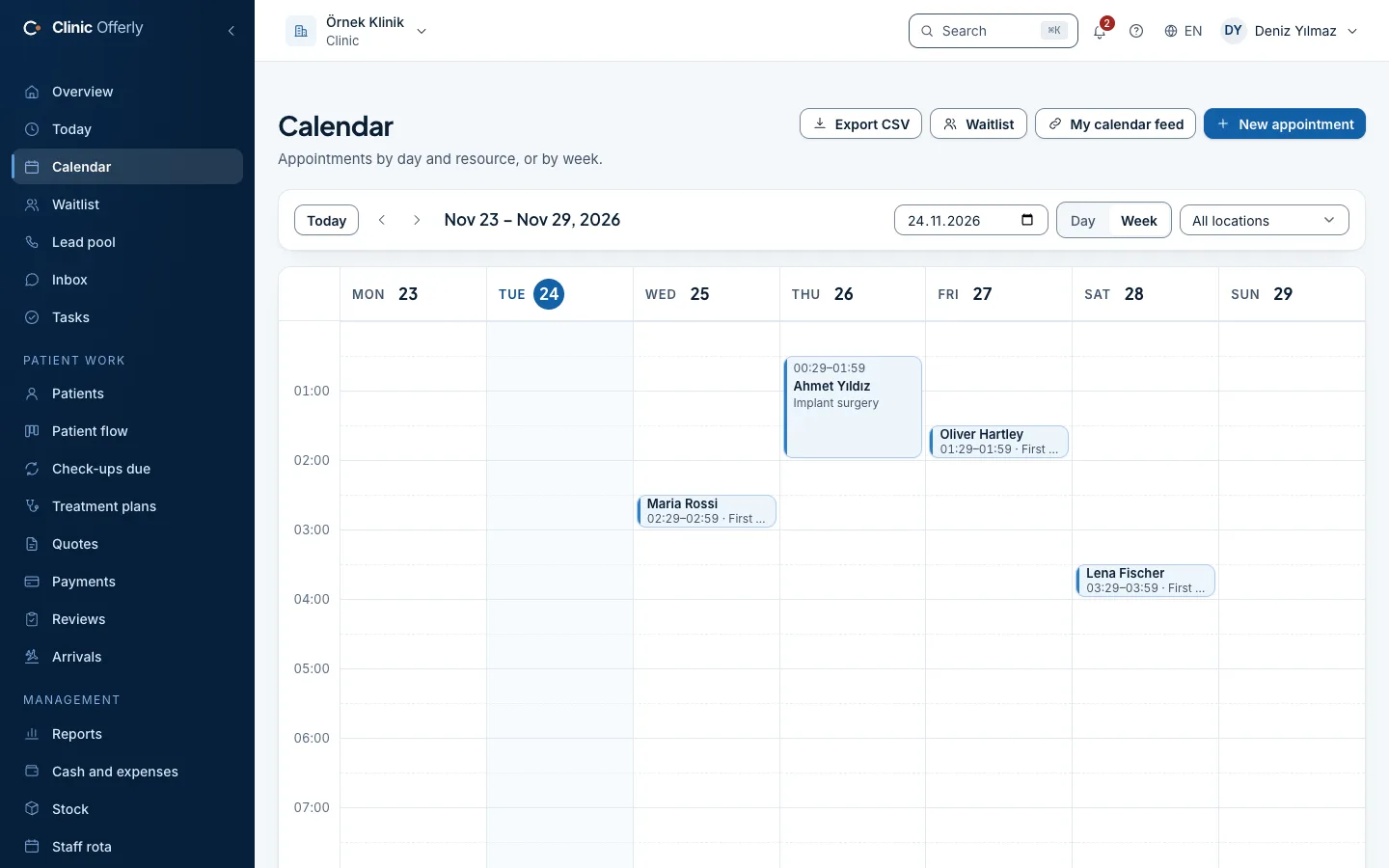
In Clinic Offerly you manage practitioner, room and device calendars for every location on one screen, and the database itself prevents double bookings. Patients book on your online booking page or a widget on your site and get e-mail reminders.
- Practitioners, rooms, devices
- An online booking page
- E-mail reminders
Between the diary, a shared calendar and the phone
How it usually goes
- Two patients land in one slot; the device turns out to be busy at the last minute.
- Appointments are given while the doctor is on leave.
- Patients have to call during opening hours to book.
- Reminders are sent by hand and no-shows go unrecorded.
With Clinic Offerly
- A practitioner, room or device can never hold two bookings at once.
- Leave and closures drop out of the free times by themselves.
- Patients book on your booking page at midnight if they like.
- Reminders go out by e-mail, in the patient's language.
Online booking page
Let patients book themselves
The patient picks the appointment type, a practitioner if they want, a day and a free time. The booking is confirmed at once or arrives as a request for you to approve.
- Practitioners with their registered titles
- A booking widget for your website
- No prices, reviews or ratings
What the patient sees
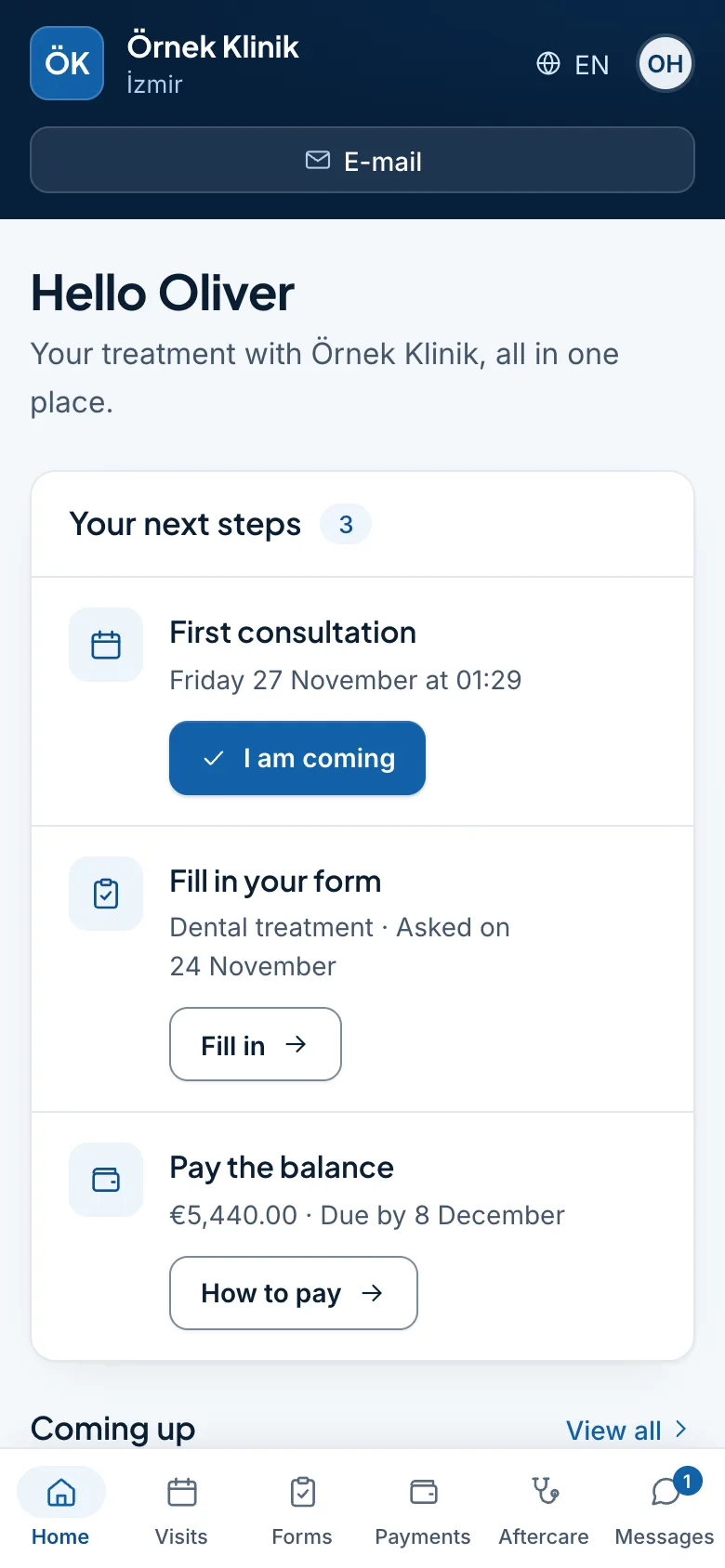
Confirmed in one tap
On the portal the patient sees their next steps and confirms waiting appointments one by one or all at once. From the e-mail link they can also cancel up to the time you allow.
- Up to three reminders per appointment
- Date and place in the location's time
- A cancelled time frees up again
What the calendar includes
- Locations and opening hoursEach location has its address, time zone, hours and breaks; enter holidays and closures in advance.
- Practitioners, rooms, devicesEach resource has its own hours, leave and locations. “One of these doctors” groups book the first one free.
- No double bookingsThe database itself checks it: if two people try to take the same time at once, only one gets it.
- E-mail remindersUp to three per appointment, between 2 hours and 7 days before, in the patient's language.
- Personal calendar feedEach practitioner adds their appointments to Google, Apple or Outlook through a one-way iCalendar feed, without patient names.
Opening your booking page
Add locations and resources
A new workspace comes with a location, you as practitioner and a 30-minute consultation; add the other doctors, rooms and devices.
Define appointment types
Set duration, buffers and the resources needed, and choose which types the page offers.
Open and share the page
Choose notice and booking horizon, reminders and the cancellation limit; share the link or add the widget to your site.
Bookings land in the calendar
The calendar team is notified; a booking moves its case to booked, the patient's arrival to arrived.
Fill the gap, bring patients back
- WaitlistPut a patient waiting for a full slot on the list; when a slot frees up it is offered to matches and the first to confirm gets it through a secure link. The booking page has a “no time that suits you?” link.
- Recall timingSet a recall interval (in months) on a service; list patients whose time has come after a completed visit and send bulk reminders or create tasks.
- Post-visit surveyA short survey goes to the patient after the visit and is answered on the portal. Results are private to the clinic and never published; no one is treated differently by score.
Can patients cancel by themselves?
If you allow it. You set how many hours before the appointment cancelling closes; the patient cancels from the e-mail link and the team is notified.
Does it work with Google Calendar?
Each practitioner can add their appointments to Google, Apple or Outlook with a private address. The feed is one-way; events created in Google do not come back to Clinic Offerly.
Can we run several locations in one calendar?
Yes. Each location has its own hours and time zone, and you filter the calendar by location. The number of locations depends on your plan.
Can reminders go by SMS or WhatsApp?
Yes, if you connect your own Netgsm, İleti Merkezi or Twilio account, or a WhatsApp Cloud API account; Clinic Offerly charges nothing for them and they are informational. E-mail in the patient's language stays the default and the fallback.
Can I see no-shows?
Marking an appointment as a no-show adds to the contact's no-show count and frees the time; reports count them too.
Related reading
Free tools
30-day free trial
Try Clinic Offerly with your own team
Every feature is open for 30 days, and no card is needed to start.