
How to get more patients for your clinic, within the legal limits
Published 23 October 2026Reviewed 23 October 20265 min read
On this page
What should you look at before trying to grow patient numbers?
Patient numbers are the product of two things: how many people reach you and how many of them become patients. In most clinics the second can be improved more than the first: unanswered messages, callbacks that never happen, phone calls that do not turn into appointments. Before looking for new patients, measure how many current enquiries become appointments.
The routes below follow the rules in force in Türkiye. The Regulation on Promotion and Information Activities in Health Services of 12 November 2025 (no. 33075) repealed the earlier regulation of 2023; do not rely on old summaries.
What is and is not allowed?
A plain summary of the principles in Article 5 of the 12 November 2025 regulation; read the text or ask your lawyer before you decide.
- Stating address, contact, opening hours, specialty and titles
- Not allowedAnnouncing prices, discounts, campaigns and promotions
- Accurate content that helps people protect their health
- Not allowedSharing patient thank-you and satisfaction messages as advertising
- A website showing its last update date and the content editor's contact details
- Not allowedContent that steers patients to a practitioner or facility, gifts and incentives
- Paid listings on search engines and social media (not prominent, within the rules)
- Not allowedPromotional messages, SMS, e-mails and calls without the person's knowledge and consent
- Visual content with the patient's written consent, under the conditions in Article 7
- Not allowedStatements that disparage others or claim superiority
Lawful, lasting ways
Make your website informative
A separate page for each service: what it is, who does it and how to book. Titles must match the diploma. Show the last update date and the content editor's contact details on the page.
Complete your Google Business Profile
Google asks that the profile name match your real-world name, that the address and hours are accurate and that descriptions carry no prices or promotions; choose a few specific categories. Practitioners who share a location can each have their own profile.
Reply to enquiries quickly
Most people choose the clinic that replies first; your own figures can show it. Set a target time and see which enquiries are late.
Make booking easy
A patient who can choose a slot on your website without waiting on the phone books more often. Show only slots that are really free.
Follow up those who come
Recall patients whose check-up is due, who left treatment half-done or who never came back. Finding a new patient is often costlier than keeping an existing one.
Let satisfied patients recommend you, but do not incentivise it
A satisfied patient recommending you is natural; gifts, discounts or rewards are the incentives the regulation bans. See our guide on patient reviews for the review rules.
Measure
Record where each enquiry came from and see which source turns into appointments and treatment.
Do in the first month
- The website shows a last update date and a content contact
- Service pages carry no prices, discounts or campaigns
- The Google Business Profile is complete with address, hours and categories
- Every enquiry is recorded with a source label
- A target time for the first reply is set
- The booking link is on the website and the profile
- Patients whose check-up is due are listed each week
- Patient visuals are used only with written consent and within the rules
How do you do it in Clinic Offerly?
Clinic Offerly does not advertise, run campaigns or find patients; it helps you not to lose the enquiries that arrive and to turn them into appointments.
Enquiry form and booking page
The enquiry form embedded on your site and the booking page turn each enquiry, with its source (including UTM), into a case.
A response-time target
In case settings you set a first-reply target and a late warning; enquiries are shared out in turn or by hand.
Follow-up and appointment reminders
Aftercare plans and e-mail reminders help keep the patients who come.
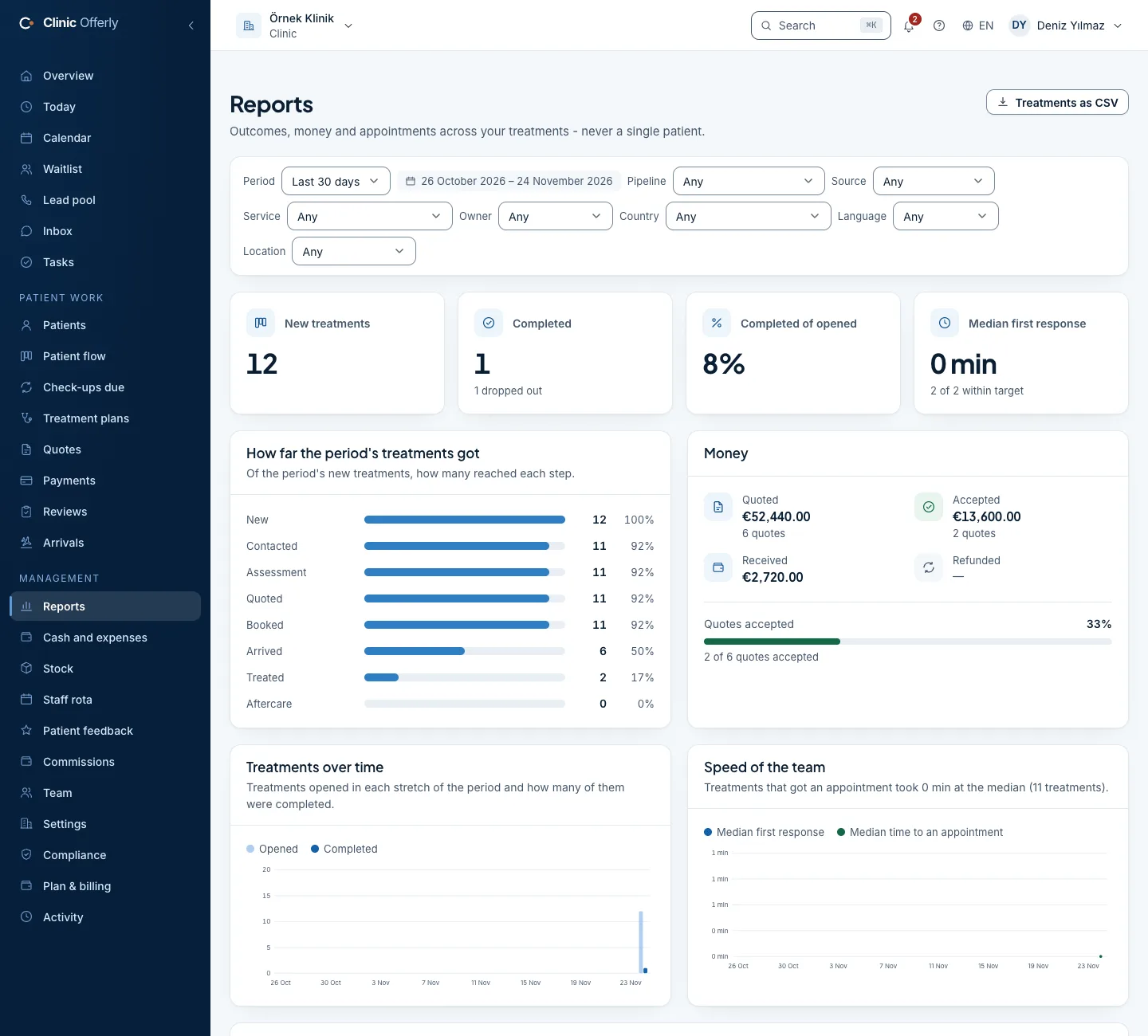
Reports
Conversion by source, campaign (utm_campaign) and service, median time to first reply and no-show rate.
Reports
Which source really brought patients?
The conversion funnel by source and service, median time to first reply and the no-show rate.
- Breakdown by source and campaign
- Exports as CSV
- Follows record-visibility rules

Frequently asked questions
Can my clinic run Google ads?
Under the regulation, paid listings on search engines and social media are possible under conditions (not prominent, within the rules) and cannot carry prices, discounts or campaigns. The rules change often, so check the text and the Ministry's FAQ document.
Can I publish a price list on my website?
Price, discount and campaign information is banned in domestic promotion under Article 5 of the regulation. Give prices to the patient individually, in a personal quote.
Can I share patient reviews on my site?
Sharing thank-you and satisfaction messages for advertising is banned (Article 5). See our patient reviews guide for the rules on collecting and answering reviews.
How much should I pay per patient?
That varies by clinic; measure your own figures by source. The free patient acquisition cost calculator helps you divide total spend by the number of patients.
Will Clinic Offerly bring me patients?
No. Clinic Offerly is not a marketplace or an advertising tool and takes no commission; it helps you not lose the enquiries that arrive and measure the sources.
Sources
- Regulation on Promotion and Information Activities in Health Services, Articles 4, 5, 7 and 13 (Turkish) — Official Gazette, 12 November 2025, no. 33075
- Google Business Profile guidelines — Google
- Law No. 6698 on the Protection of Personal Data (Turkish text) — Mevzuat Bilgi Sistemi
Turn every enquiry into an appointment
An enquiry form, a booking page, a response-time target and a source report.
Related reading
30-day free trial
Try Clinic Offerly with your own team
Every feature is open for 30 days, and no card is needed to start.