
The compliance center: privacy texts, retention and access
Published 20 October 2026Reviewed 20 October 20263 min read
Set up the compliance center
The compliance center is open to owners and administrators. A new workspace starts with the privacy notice and the explicit-consent text published in Turkish and English.
Look at the overview
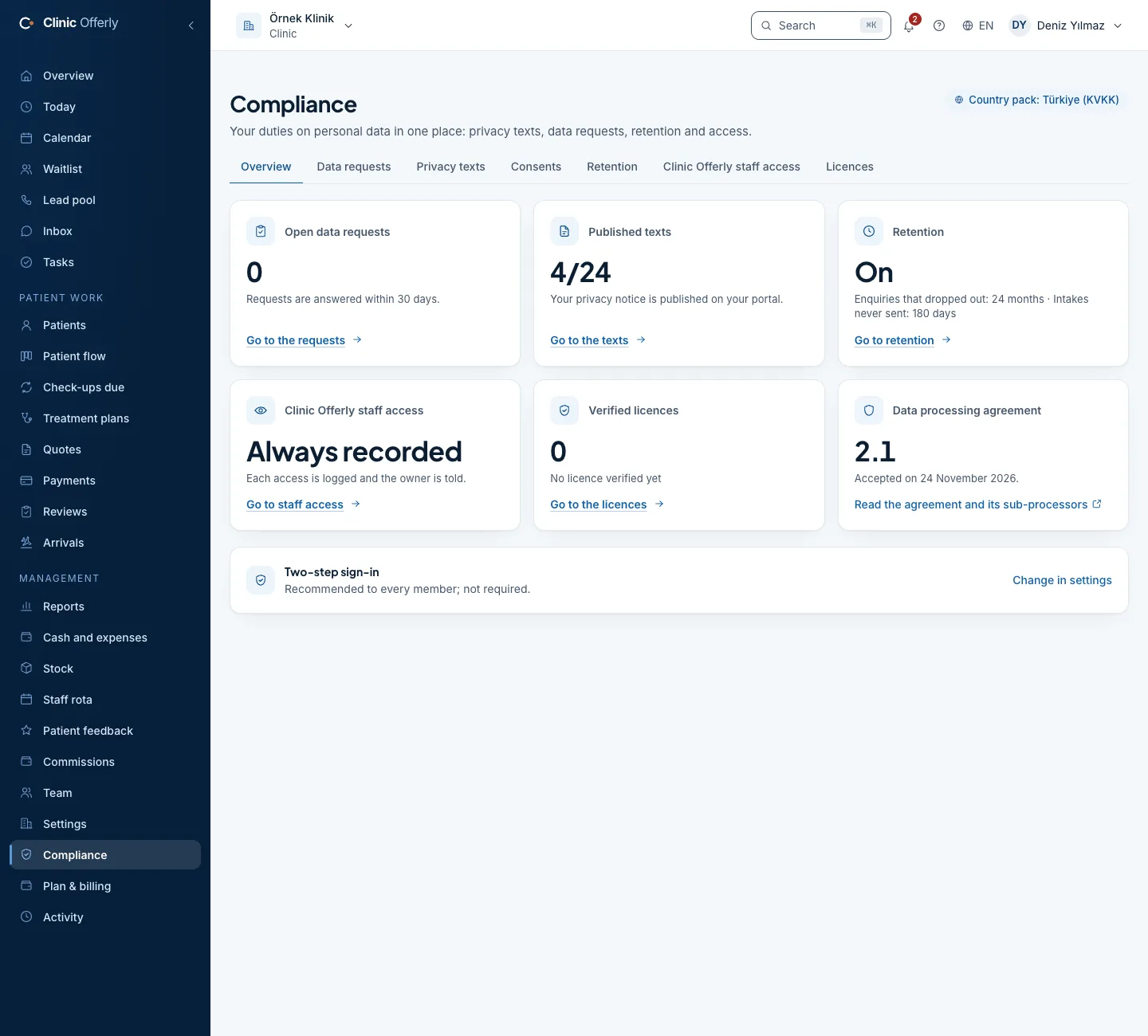
Compliance center → Overview shows open requests, whether your privacy notice is published, the retention setting, staff access and licences.
Edit the texts
On the Privacy texts tab the privacy notice, explicit consent, photo and video consent and marketing consent start from your country pack's template with your details filled in. The places only you know stay as {{markers}}; you cannot publish until they are filled in.
Publish
Press “Publish”. Every version is kept with its number and you can read earlier ones. A text equal to the version in force is not published again.
Use the notice everywhere
“Use the published notice everywhere” makes the published text the privacy link of your booking page, lead forms and portal. A person who acknowledges it has the version they read on their record.
Set the retention periods
On the Retention tab choose after how many months closed-lost leads, and after how many days intakes never sent, are erased. Your country pack sets the limits. Patients, people whose processing is restricted and people with an open request are never erased this way.
Follow Clinic Offerly staff access
The Clinic Offerly staff access tab explains how authorised staff reach a workspace. Every access and action shows in the activity log with the person's name and the reason, and the owner is notified by e-mail and in the app each time an access starts. You do not grant or withdraw it; the record cannot be deleted.
Record your licences
On Licences add the licences your country pack lists with number, issuer and valid-until date, and optionally the document. Verification is optional and locks nothing. You are told 30 days before one ends.
Download the activity log
On the activity screen “Export as CSV” downloads the log of the chosen days, oldest first, up to 50,000 entries.
Frequently asked questions
Do I choose the country pack?
Your workspace's country selects it: the KVKK pack for Türkiye, the EU/UK pack for other countries. The pack sets the request deadline and the retention limits.
Can support see my patient records?
Authorised Clinic Offerly staff can open your workspace directly for support, operations, security and legal obligations, so yes, that can include records. They are bound by confidentiality, every access and action is written to an audit log that cannot be deleted, and you see it in your activity log.
Related reading
30-day free trial
Try Clinic Offerly with your own team
Every feature is open for 30 days, and no card is needed to start.